
What It Does
A Complete Move Playbook, Generated by AI
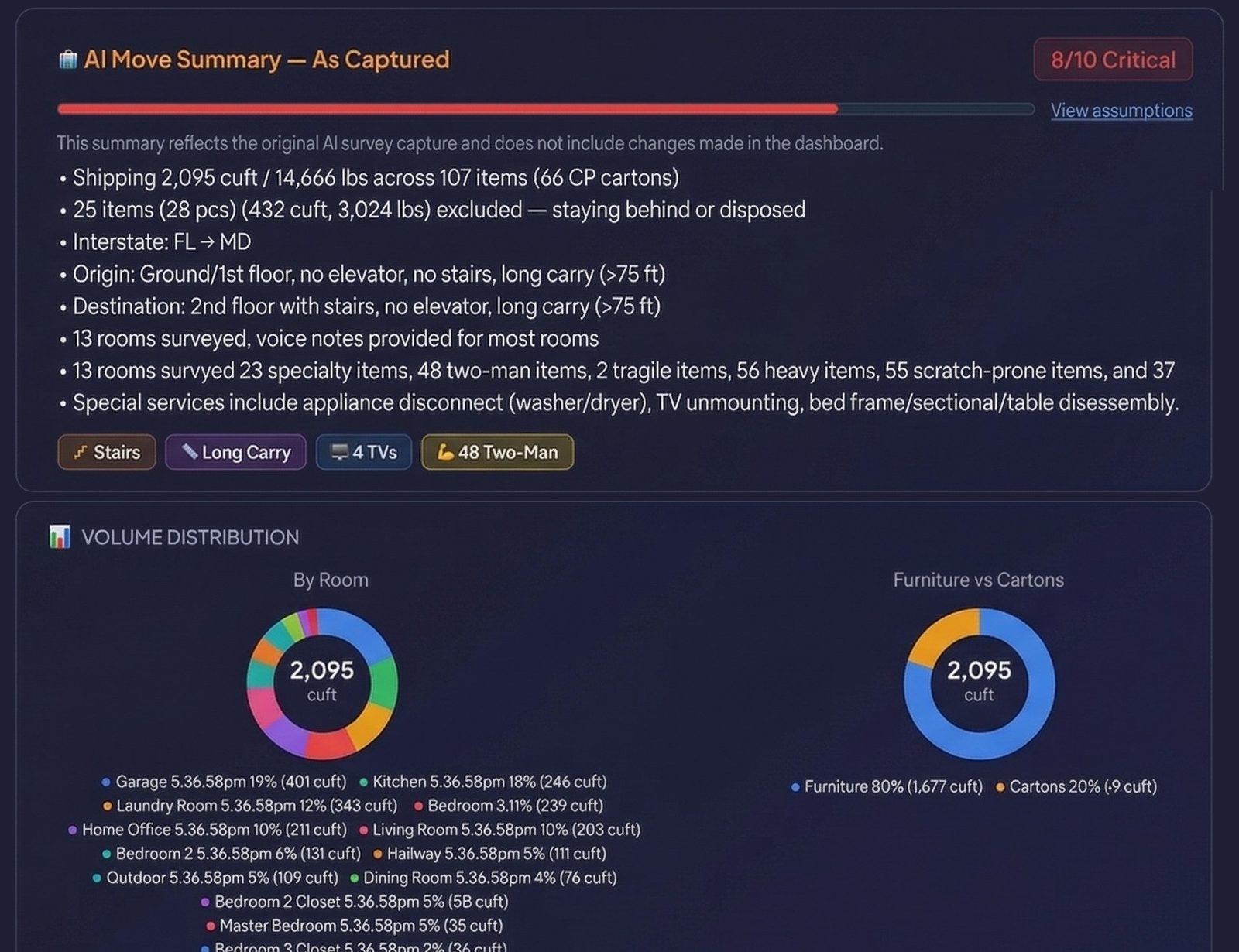
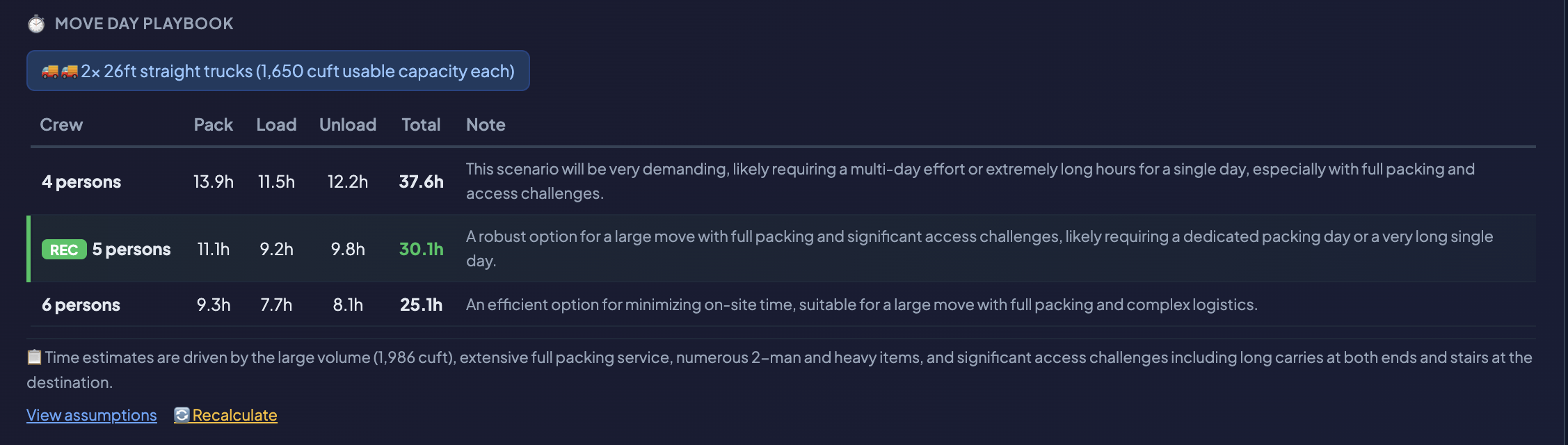
After the AI builds your inventory, it goes one step further: it generates a full Move Summary with crew size recommendations, truck counts, packing/loading/unloading hour estimates, risk flags, and actionable tips for your estimator. Three crew scenarios let you compare labor costs at a glance.
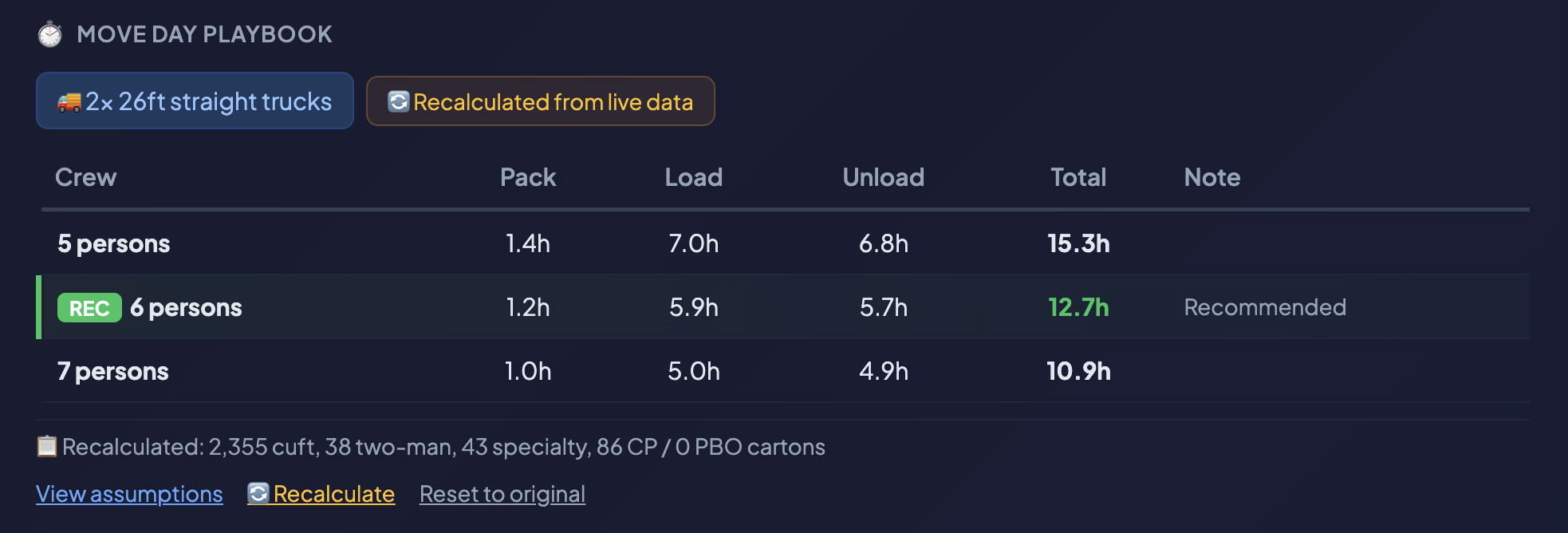
The summary isn’t static. When your rep edits the inventory — adding items, changing quantities, reassigning cartons — the Recalculate button recomputes crew hours and truck counts from the live data. The math is transparent: every assumption (packing rate per person-hour, stairs multiplier, long-carry penalty) is visible and auditable.
Why It Matters
Faster Quotes, Fewer Estimation Errors
- ✓ Three crew scenarios, one click. See exactly how pack, load, and unload hours change with different crew sizes. A recent 8,800+ cu ft interstate move showed the difference between a 5-person crew (66 hours) and a 7-person crew (47 hours) — your estimator sees that instantly.
- ★ Risk flags surface before the quote goes out. The AI identifies potential issues: extreme volume requiring multiple trucks, high concentrations of 2-man items increasing labor density, or stairs and long carries at both ends compounding cycle time. Reps see these before the customer sees a price.
- ⚠ Estimates stay accurate as inventory changes. Rep adds three items the customer forgot? Removes a room that isn’t moving? Hit Recalculate and the crew hours and truck count update from the current inventory. No manual spreadsheet work.
- ⚙ Show your work. Every estimate is backed by visible assumptions: base packing rate, loading rate, 2-man penalty minutes, stairs multiplier, long-carry multiplier, specialty penalty, and carton packing time. Your operations team can audit or adjust the model at any time.
How It Works
From Inventory to Estimate-Ready Playbook
AI Analyzes the Full Inventory
After consolidation, the AI reads the complete inventory across all rooms: shipped items, excluded items, carton counts (CP vs. PBO), handling tags (2-man, heavy, fragile, needs-crate), voice-note exclusions, and questionnaire responses including access details.
Move Summary Generated
The AI produces a structured summary: move scope bullets, estimator tips, customer priorities, risk flags, room-by-room summaries, and a crew-and-duration playbook with three crew scenarios. For military moves, a dedicated pro-gear section breaks down M-PRO and S-PRO weights against allowances.
Rep Reviews in the Dashboard
Click the AI button in the dashboard header to open the Move Summary overlay. Sections include a complexity score gauge (1–10), condition badges (stairs, long carry, TVs, 2-man items), volume breakdowns by room, and the full Move Day Playbook with crew scenarios.
Edit Inventory, Then Recalculate
When the rep changes the inventory — adding items, adjusting quantities, moving items between cartons — the dashboard totals update in real time. Click Recalculate in the playbook section and the crew hours, truck count, and scenarios recompute from the live data using the AI’s pre-built assumptions.
View Assumptions for Full Transparency
Click “View assumptions” to see every rate the AI used: base pack/load/unload rates per person-hour, 2-man penalty minutes, stairs and long-carry multipliers, specialty item penalties, carton packing times, and truck capacity. Reset to the original AI values at any time.
Key Capabilities
What’s Included
3 Crew Scenarios
Recommended crew size plus one above and one below. Each scenario shows pack, load, and unload hours separately so you can price labor accurately.
Live Recalculate
One click recomputes crew hours and truck counts from the current inventory. Reads live volume, 2-man count, specialty count, and CP/PBO carton breakdown.
Risk Flags
AI-generated warnings about potential issues: extreme volume, high 2-man density, stairs + long carry compounding, or shuttle requirements for tight access.
Estimator Tips
Actionable, move-specific advice for the sales rep. “Plan for multi-day load with 6+ crew.” “Safe in laundry room requires specialized equipment.”
Room Summaries
Per-room content summaries highlighting notable items, handling requirements, exclusions, and estimator notes. Click any room to jump to its inventory.
Transparent Assumptions
Every rate visible: packing rate (cu ft/person-hr), loading rate, 2-man penalty (minutes), stairs multiplier, long-carry multiplier, truck capacity (cu ft).
From inventory to estimate in one dashboard
Stop building crew plans in spreadsheets. The AI Move Summary gives your estimators a ready-made playbook that updates as the inventory changes.
Start Your Free Trial